Google 1970s CLI Terminal
By empirical-hyena-7 · 7 months ago · 10+ installs
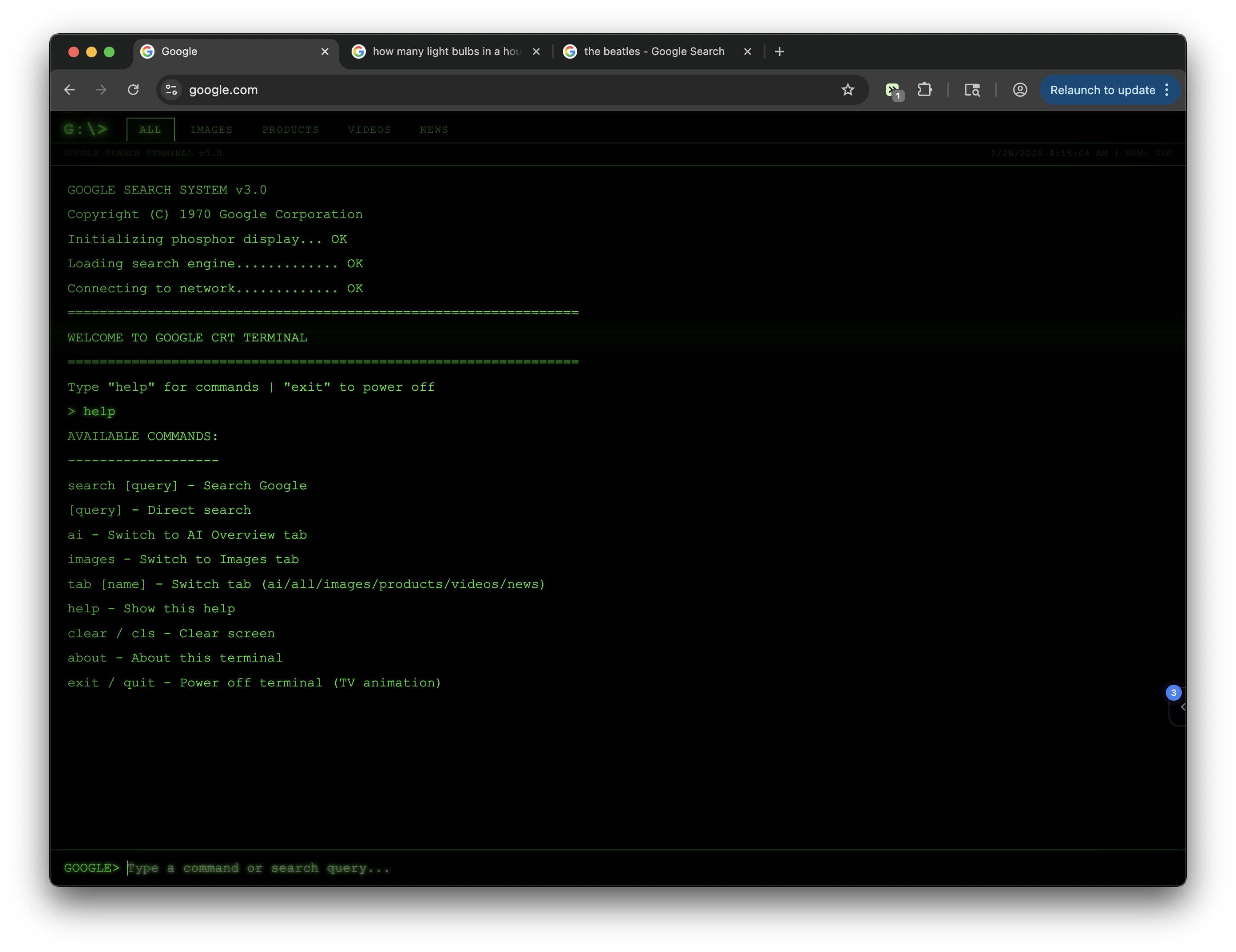
Transforms Google into a fully functional 1970s command-line interface with authentic terminal aesthetics
Key Highlights
- Replaces Google with a green-on-black 1970s terminal interface
- Lets you search by typing a query or using the "search" command
- Shows Google search results as numbered terminal-style entries
- Opens clicked result titles in a new tab
- Includes help, clear, and command history controls within the terminal
Details
This tweek transforms google.com into a 1970s-style command-line terminal with a black screen, green monospace text, blinking cursor, and CRT-inspired scanline and flicker effects. Instead of Google's standard layout, you type a search directly into the terminal-style prompt or use commands like search, help, and clear.
On Google search result pages, the terminal view displays extracted search results with numbered entries, visible URLs, snippets, and clickable titles that open in a new tab. It also keeps a command history with the up and down arrow keys, making repeated searches feel like working inside a vintage text terminal.
Runs on
1 site
Developer
Tweek Code
601 lines ·