NYT Strands Solver: Hints Without Spoiling the Puzzle
A Strands solver that helps instead of spoiling. The sidebar tweek finds every word on today's board and lets you pick your own hint level, from letter counts up to the spangram.
Strands is the friendliest-looking puzzle the New York Times makes, and some days it's the meanest. You get a six-by-eight grid of letters that hides a themed word list, plus a spangram snaking from one side of the board to the other. On a good day you clear it before your coffee cools. On a bad day the theme is a pun you refuse to see, and you spend twenty minutes dragging your finger through the same corner producing words like TOAD.
There are plenty of Strands solver sites that will hand you the day's full answer key. Search for today's puzzle and you can have every theme word in ten seconds, along with the mild emptiness of having solved nothing. The Strands Solver Sidebar is built for the other outcome: it shows you what's possible on the board and lets you decide how much help to take, one step at a time.
A Strands Solver That Doesn't Spoil the Puzzle
The sidebar has no idea what today's theme is, and everything good about it follows from that. It searches the board with a dictionary, so it finds every English word that can be traced through the unused letters, from the four-letter minimum up to monsters. The theme words are in that list somewhere, but they are standing in a crowd of a few thousand candidates, and the sidebar can't tell you which ones they are.
That limitation is what makes it work as a helper. An answer site can only give the solution away, but a dictionary solver hands you raw material and leaves the connect-the-theme part, which is the whole game, to you.
What the Sidebar Shows You
Install the tweek and a small panel appears on the Strands page. You can drag it anywhere and collapse it when you want it quiet. Inside:
- Live letter counts: how many letters are unused, selected, part of a found theme word, or part of the spangram. The counts update as you play, so it doubles as a progress meter.
- A Find Words button that searches the board and lists everything it finds, longest words first, each tagged with its length and direction.
- A filter box and a length dropdown, so you can look at only the 6-letter words, or only words containing "OO".
- Click any word in the list and its path lights up as rings on the actual board. Trace it in the game and the rings clear themselves once the letters turn blue or yellow.
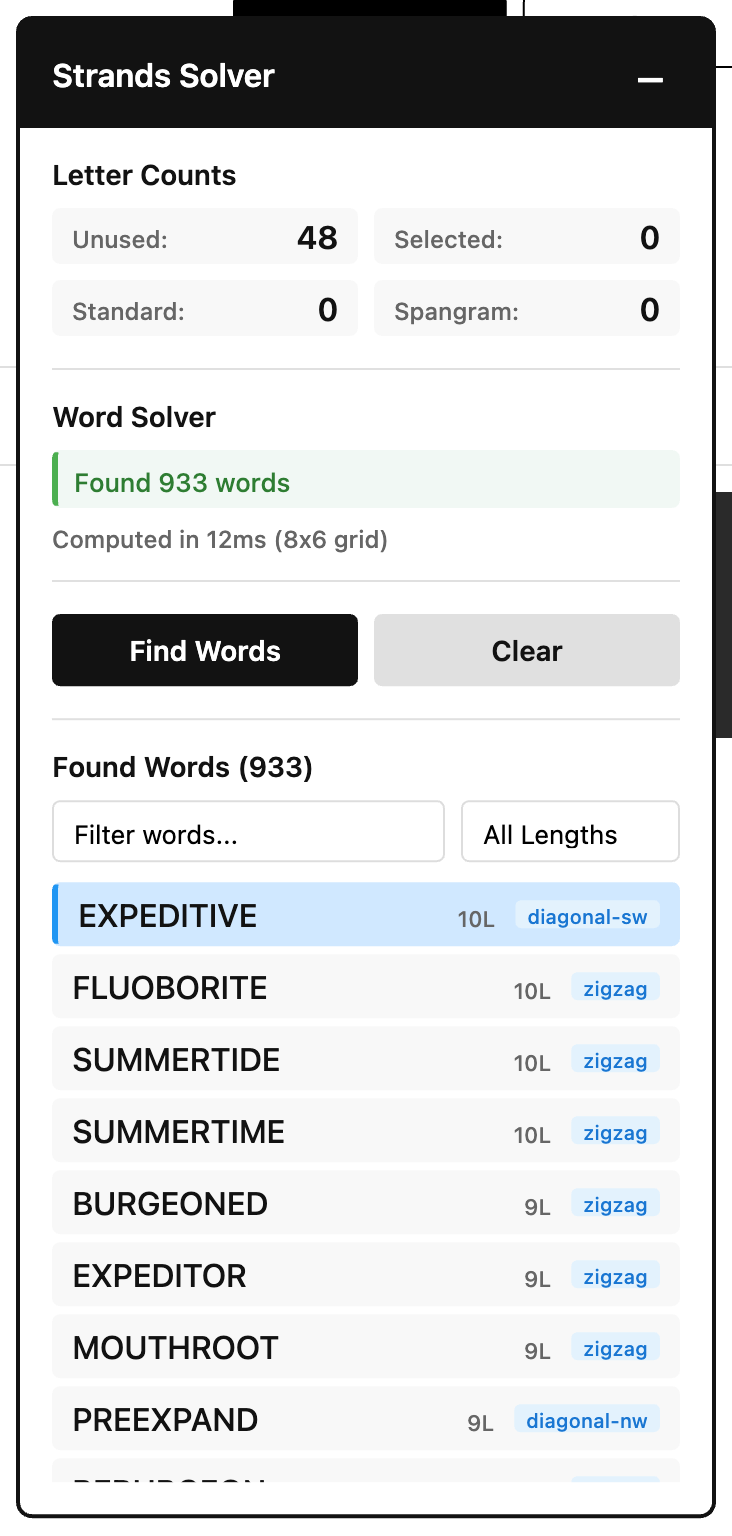
The solver only searches letters you haven't used yet, and it re-runs automatically each time you find a theme word. Late in a puzzle it's quietly listing what remains, which is when you want it most.
The Hint Ladder
The point of the sidebar is choosing your own spoiler level. From gentlest to heaviest:
- Counts only. Keep the panel collapsed and peek at the letter counts. Knowing there are 11 unused letters left, and therefore probably two words, is often enough to restart a stalled brain.
- Earn official hints, faster. Strands gives you a hint for every three non-theme words you find, and the official hint circles one theme word's letters without revealing the order. The sidebar's word list is hint fuel: trace any three words from it and cash in. The dictionary behind it is generous to a fault, so this is also how you learn that ETUI and ADIT are, apparently, words.
- Study the shortlist. Read the word list without clicking anything. Somewhere in there are today's answers wearing fake mustaches. Scanning for words that fit the theme is a softer version of the puzzle, but it's still the puzzle.
- Light up a path. Genuinely stuck on the last word? Filter to the length you need, click a candidate, and follow the rings.
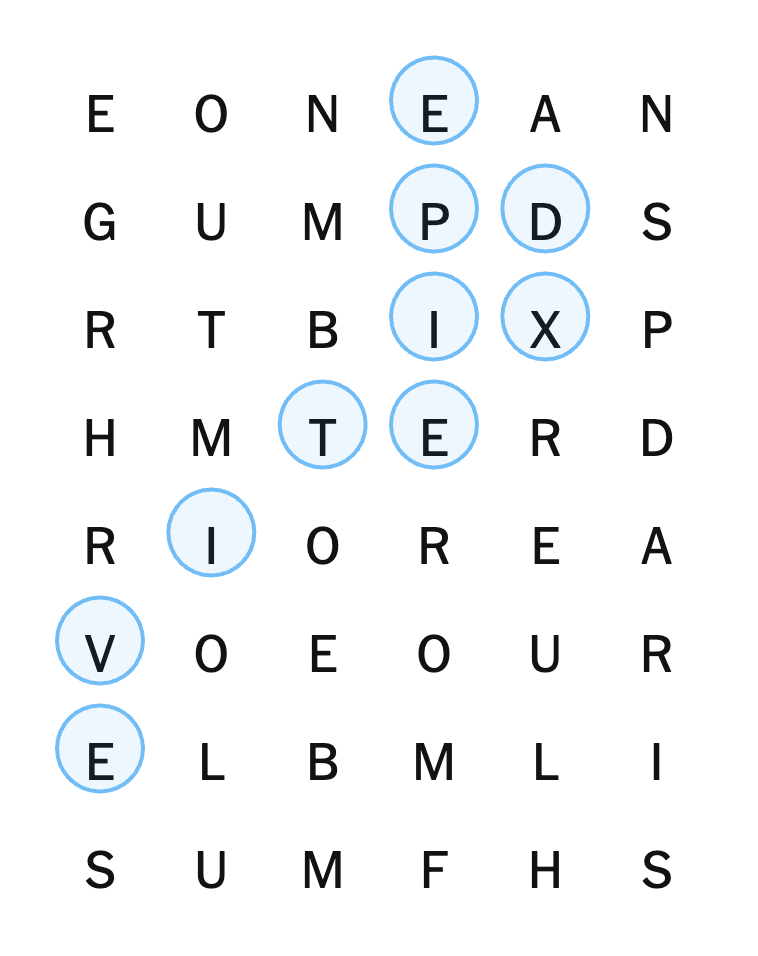
Nobody grades you on which rung you stop at. The sidebar's job is making sure "look up the entire answer key out of spite" stops being the only exit.
Hunting the Spangram
The spangram is the long themed word (occasionally two words) that touches two opposite sides of the board, and it's where most Strands games go sideways. It's also where the sidebar helps most, because spangrams are long, and the word list is sorted longest first.
Open the length filter, pick 8+, and you're looking at every long word the board can produce. Most of them are nonsense for today's theme, but the spangram candidates are a short list, and the direction tags help: a word marked zigzag that runs the width of the board is worth a second look. You are still the one who has to recognize the theme in it, so the aha survives.
How the Solver Works
For the curious, the sidebar is a classic word-search algorithm wearing a nice UI.
On load it fetches a public-domain list of about 370,000 English words and packs it into a trie, a prefix tree that can answer "does any word start with these letters?" instantly. Then it runs a depth-first search from every unused square on the board, extending through all eight neighboring directions, just like your finger does. The trie is what keeps this fast: the moment a path spells a prefix no English word starts with, the search abandons it and backtracks. Thanks to that pruning, the whole board solves in a few hundred milliseconds, and the sidebar reports the time so you can watch it brag.
Words shorter than four letters are ignored, matching the game's own rules, and each result is classified by the shape of its path: horizontal, vertical, diagonal, or zigzag. Strands being Strands, it's mostly zigzag.
The dictionary download from a public GitHub repository is the tweek's only network request. The board itself never leaves the page, there's no account involved, and the full source is on the share page if you want to read it before installing.
Install It
- Install the Tweeks extension for Chrome or Firefox.
- Open the Strands Solver Sidebar share page and click install.
- Open today's Strands and click Find Words.
If Strands is part of a bigger NYT games habit, there are more tweeks for the site; browse nytimes.com. And if you want the sidebar to behave differently, it's a tweek, so you can open it in Tweeks and ask: hide the word list until you click, cap the hints at level two, whatever keeps the puzzle fun for you.
The puzzle stays yours to solve. The sidebar just makes sure you never finish it angry.